
What Are Google Ads?
Google Ads (formerly known as AdWords) operate on a pay-per-click model, in which website owners bid on keywords and pay for each click on their advertisements. Every time a search is initiated, Google digs into the pool of advertisers and chooses a set of winners to appear in the results page. The “winners” are chosen based on a combination of factors, including the quality and relevance of their keywords and ad campaigns, as well as the size of their budgets.
More specifically, who gets to appear on the results page is based on an advertiser’s Ad Rank, a metric calculated by multiplying two key factors – CPC (cost-per-click) Bid (the highest amount an advertiser is willing to spend) and Quality Score (a value that takes into account your click-through rate, relevance, and landing page quality). This system allows winning advertisers to reach potential customers at a cost that fits their budget. It’s essentially a kind of auction.
A successful Google Ads campaign is made up of 6 things:
- Expectation setting
- Keyword research
- Ad copy
- Landing Page/Site quality
- Tracking
- Optimization
Expectations
The great thing about Google Ads in comparison to Organic SEO is the time to placement is extremely fast. For new accounts, you can have an Ad running and receiving traffic in less than a week. Organic optimization can take 4 – 12 months of dedicated work to see meaningful results. With Ads, however, it’s important to set the proper expectations with what your ROI will be. As the system is an auction, we see plenty of people who want to “test the waters” with a small daily budget. This typically results in a campaign that yielded few conversions, a frustrated client, and a mindset that Ads just doesn’t work for my business. If you are considering running an Ads campaign, we’d want to set the expectations by asking a few questions:
- What is the goal and/or how would we count conversions? This is easy for an ecommerce site, as a conversion = a sale. For a lead generation site, however, we would want to discuss what counts as a conversion. Some ideas are form completion, click-to-call, newsletter sign up, etc.
- What is the conversion worth to your company?
- For ecommerce, what is the COGS on the sale?
- For lead generation, what is your average close rate as a percentage?
Knowing these items will help us run a few scenarios through our goal calculator to see if running an Ads campaign makes sense for your company. If you're also investing in local SEO Bellingham WA or other organic channels, understanding how paid and organic work together gives you a clearer picture of overall marketing ROI.
Keyword Research
Knowing what keywords to bid on is critical to your campaign’s success. We tend to recommend bidding on keywords that are in the middle or bottom of the sales funnel, not top of the funnel. Meaning we tend to bid on keywords that are more action oriented than research oriented; especially for ecommerce sites. The keywords that you bid on should closely match your service offerings, your main benefits, and your call to action.
Doing the keyword research up front (and not just taking Google's suggestions) will go a long way in making sure your campaign is a success. This research process is similar to what we use for SEO services Bellingham WA — understanding what your actual customers type into Google is the foundation of both paid and organic success.
Ad Copy
Actually writing a Google ad is challenging. You have very definite character limits and rules that you have to follow in order to get the ad approved. We recommend sitting down with a pen and paper (or Word and keyboard) and brainstorming a couple dozen headlines before you start creating your Ads. Google headlines are 30 characters, so you’ll need to keep your headlines within that limit. But think through what you are offering, how you can clearly state your unique selling/value proposition, what your call to action is, what the customer’s pain point might be when they’re looking to call you, etc. For each Ad, Google will show up to 3 of your headlines – but sometimes they’ll just show 2.
After you have a bank of headlines created, think about your body copy for the ad. Google gives you 2 description sections each with a 90 character limit.
Pro tip: Write separate ads for each of your main services, don’t try to cram all of them into one ad.
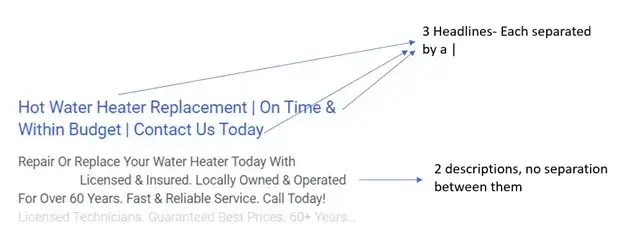
Landing Page/Site Quality
In the example above, we are bidding on keyword related to hot water heater/tank replacement. When someone clicks on that link, they are taken to a page all about hot water tanks. On that page you’ll find hot water heater common issues (identifying and connecting with the problem), common repairs, tips, social proof (reviews) that this company can do all the repairs you might need and, of course, a call to action to be able to schedule an appointment to get your tank repaired. There is nothing on this page about clogged toilets, leaking pipe repair or sump-pump installation – this ad is all about Hot Water Tanks and so is the page we take people to. This product/service specific page is called a landing page. The more relevant the landing page is to your ad, the higher your quality score will be. Landing pages can just be pages on your site, we just don’t want to send people to your homepage and have them wonder what the next step might be.
It is also critical that if you are running ads and generating traffic to your site that you have a couple basic things covered. You need to have an SSL certificate on the site and your site needs to be built for mobile traffic. Each page must have a call-to-action as just bringing traffic to your site is not going to increase your bottom line.
Tracking
The hardest part about Google Ads is making sure the technical bits are all taken care of. In order to properly track how your campaign is doing, you’ll need to tell Google what counts as a conversion. This requires installing Google Tag Manager on your site (dropping a bit of code) and an event tracker for each conversion tracked (also code added to the page). If this is not done properly you could:
- Not have any idea what your actual ROI is on Ads.
- Be double counting conversions (overestimating the ROI).
- Be tracking a non-conversion metric (like page views) as a conversion.
Without proper tracking, there is no way to tell if a campaign is successful.
Optimization
Ads is not a “set it and forget it” marketing platform. We login and monitor the accounts we manage daily. There will be budget changes, additional keywords to add (or remove or block), ad refinement, new headlines, etc. to update regularly. We do recommend giving a new account a few weeks to get some data before optimizing, but if your account has been running for more than a month, you can begin refining your account to make sure you are getting the most out of the traffic you are paying for.
Ads are a fantastic way to generate additional traffic and sales for your business. The 6 items above are a great starting point but nowhere near a comprehensive guide to getting started on Google Ads. If you’d like to have a more in-depth conversation about what Google Ads could do for your business, give us a call. We’d be happy to run you through our goal tracker to see if running an Ads campaign would make sense for your business.
Run the Numbers
Want to see what kind of traffic Google thinks we could create for your business? Fill out the form below!
Conclusion
Google Ads can deliver targeted traffic fast, but success comes down to getting the six foundations right: expectations, keyword research, ad copy, landing page quality, tracking, and ongoing optimization. Whether you're a small business owner in Whatcom County or a growing company anywhere else, paid search works best when you go in with clear goals and realistic budgets. And when you combine Google Ads with strong organic presence through proper digital marketing Bellingham strategies, you create a complete system for attracting customers from every angle.
Ready to run Google Ads that actually generate leads and sales? Contact Profusion Web Solutions at (360) 738-8188 or [email protected] to talk through your goals and run our free goal calculator.
Frequently Asked Questions
How much does Google Ads cost for a small business?
Most small businesses spend between $1,000 and $10,000 per month on Google Ads, but you set your own daily budget. The real question is whether your conversion value exceeds your ad spend.
What's the difference between Google Ads and organic SEO?
Google Ads puts you at the top of search results immediately through paid placement. Organic SEO takes months but delivers free traffic long-term. Most businesses benefit from both.
How do I know if my Google Ads are working?
You need proper conversion tracking set up through Google Tag Manager. Without tracking revenue or leads, you're guessing. Never run ads without tracking first.
What is Quality Score in Google Ads?
Quality Score is Google's rating of your ad relevance, expected click-through rate, and landing page experience. Higher scores mean lower costs and better ad positions.
Can I run Google Ads for my local Bellingham business?
Absolutely. Local targeting lets you show ads only to people searching in Whatcom County, Ferndale, Lynden, or Blaine. This keeps your budget focused on nearby customers.
Why didn't my Google Ads campaign work with a small daily budget?
Very small budgets often generate too few clicks to get meaningful data or conversions. Google's auction favors consistent, reasonable budgets that allow the algorithm to learn and optimize.
How long should I run a Google Ads campaign before deciding if it works?
Give any new campaign at least two to three weeks of data before making major changes. Constant tweaking without enough data hurts performance more than it helps.
Do I need a separate landing page for each Google ad?
Yes, whenever possible. Sending ad traffic to a page that matches the exact ad copy and keyword improves Quality Score and conversion rates significantly.
What is Google Tag Manager and do I need it?
Google Tag Manager is a free tool that lets you install and manage tracking codes without editing your website files. It's essential for proper conversion tracking.
Can Google Ads help if my website is old or not mobile-friendly?
Not effectively. Google checks your landing page quality, and a slow, non-mobile site will hurt your Ad Rank and raise your costs. Fix your site first, then run ads.